My first automated WordPress post from GitHub!
Author: Vaishnavi Udata
-
DBA TASKS (PostgreSQL)
- Granting DB access to User
- CREATE ROLE username WITH PASSWORD ‘new password’
NOSUPERUSER
NOCREATEDB
INHERIT
LOGIN
CONNECTION LIMIT -1;
GRANT read_role TO username;
- Removing DB Access from user
- REVOKE read_role FROM username;
- DROP ROLE username;
- Checking User Privileges
- SELECT * FROM pg_roles;
- SELECT * FROM pg_auth_members
- Resetting User Password
- ALTER ROLE username WITH PASSWORD ‘new_password’
- Locking/Unlocking a User
- ALTER ROLE username NOLOGIN;
- ALTER ROLE username LOGIN;
- Creating Read only role
- CREATE ROLE read_only_role;
- Checking Database size
- SELECT datname,
pg_size_pretty(pg_database_size(datname))
FROM pg_tables
WHERE schemaname = ‘public’;
- Granting DB access to User
-
Move a RDS DB from one aws account to another aws account using snapshot
- There was a task where I had to move RDS DB from Prod account to lower env to analyze the data.
- From the AWS RDS console, choose Actions then Take Snapshot.
- The snapshot is default encrypted and we can not share this snapshot.
- To share the snapshot, we need to make a copy of the snapshot with the Customer managed KMS key and then share the snapshot with the target account.
- Now switch to Target account, choose Snapshots and then the Shared with Me tab.
- Then Restore the snapshot from Actions and provide the required configurations such as (DB instance identifier, Engine, instance class, Storage, subnet group, security group, etc.) to match your requirements in the new account’s infrastructure.
- Click Restore DB instance.
- There was a task where I had to move RDS DB from Prod account to lower env to analyze the data.
-
SCHEDULING CRON JOBS
- There was a Task that I had to schedule refresh MV (Materialized view) cron jobs for every 20min every day, which keeps the Materialized views up-to-date with fresh data from their base tables.
- For this I have created Script files in an Oracle server with Database details like HOST, PORT, DBname, User and DB schema.view and also redirected it to log file.
- I have passed a username and password in a .pgpass file to automate the process.
- There was a Task that I had to schedule refresh MV (Materialized view) cron jobs for every 20min every day, which keeps the Materialized views up-to-date with fresh data from their base tables.
-
STREAMING CLOUDWATCH LOGS TO AMAZON S3 USING KINESIS DATA FIREHOSE
- Streaming CloudWatch Logs to an S3 bucket using Amazon Kinesis Data Firehose for real-time log archival, analysis, and long-term storage.
Architecture flow would be
CloudWatch logs (subscription filter) — Kinesis Firehose — S3
- Step1: I have created an S3 bucket to store the logs
Bash
aws s3 mb s3://cloudwatch-logs-bucket –region us-east-1
- Step2: I have created IAM roles for CloudWatch logs and Kinesis firehose with required permissions
# Trust policy for CloudWatch logs:
{
“Version”: “2012-10-17”,
“Statement”: [
{
“Effect”: “Allow”,
“Principal”: {
“Service”: “logs.amazonaws.com”
},
“Action”: “sts:AssumeRole”
}
]
}
# IAM policy for Firehose access:
{
“Version”: “2012-10-17”,
“Statement”: [
{
“Effect”: “Allow”,
“Action”: [
“firehose:PutRecord”,
“firehose:PutRecordBatch”
],
“Resource”: [
“arn:aws:firehose:us-east-1:ACCOUNT-ID:deliverystream/cloudwatch-logs-to-s3”
]
}
]
}
# Create the role
aws iam create-role \
–role-name CloudWatchLogsToFirehoseRole \
–assume-role-policy-document file://cloudwatch-trust-policy.json
# Attach the policy
aws iam put-role-policy \
–role-name CloudWatchLogsToFirehoseRole \
–policy-name CloudWatchToFirehosePolicy \
–policy-document file://firehose-policy.json
# Trust policy for Kinesis firehose
{
“Version”: “2012-10-17”,
“Statement”: [
{
“Effect”: “Allow”,
“Principal”: {
“Service”: “firehose.amazonaws.com”
},
“Action”: “sts:AssumeRole”
}
]
}
# IAM policy for S3 access
{
“Version”: “2012-10-17”,
“Statement”: [
{
“Effect”: “Allow”,
“Action”: [
“s3:AbortMultipartUpload”,
“s3:GetBucketLocation”,
“s3:GetObject”,
“s3:ListBucket”,
“s3:ListBucketMultipartUploads”,
“s3:PutObject”
],
“Resource”: [
“arn:aws:s3:::my-cloudwatch-logs-bucket”,
“arn:aws:s3:::my-cloudwatch-logs-bucket/*”
]
},
{
“Effect”: “Allow”,
“Action”: [
“logs:PutLogEvents”
],
“Resource”: [
“arn:aws:logs:us-east-1:ACCOUNT-ID:log-group:/aws/kinesisfirehose/*:log-stream:*”
]
}
]
}
# Create the role
aws iam create-role \
–role-name FirehoseToS3Role \
–assume-role-policy-document file://trust-policy.json
# Attach the policy
aws iam put-role-policy \
–role-name FirehoseToS3Role \
–policy-name FirehoseS3Policy \
–policy-document file://s3-policy.json
- Step3: Created Kinesis firehose delivery stream by passing required values
Source: Direct PUT
Destination: Amazon S3
Delivery strem name: cloudwatch-logs-to-s3
Destination settings:
S3 bucket: cloudwatch-logs-bucket
Select IAM role (firehosetoS3Role)
- Step4: Created cloudwatch logs subscription filter using console
Navigate to cloudwatch and select the log group and click on Actions à create subscription filter à create amazon data subscription filter
In configure section:
Choose destination as Firehose delivery stream
Grant permission (cloudwatchLogsToFirehoseRole)
Configure log format and filters (csv)
Gave subscription name as cloudwatch-to-firehose-filter
Subscription pattern: leave empty to capture all logs or use a pattern
Then click start streaming
-
PUSH docker image to Jfrog artifactory
- For private and secure storage our organization prefer to store docker images in Jfrog artifactory.
- The image can be scanned for vulnerabilities before deployment.
- It can be stored with the multiple versions of the same image with different tags.
- Artifactory can cache public images from Docker Hub, reducing external dependencies and download times.
To push a docker image to Jfrog Artifactory, we need to login to Artifactory Docker Registry.
<docker login <artifactory-url>
pull docker image from Docker hub
<docker pull <image name>
Tag the image
<docker tag local-image artifactory-url/repo/image-name>
push the image
<docker push artifactory-url/repo/image-name>
-
UPDATE KERNEL FOR SECURITY PATCH UPDATES
- To update kernel first we need to list all installed kernel versions and check the currently running kernel.
<< rpm -qa kernel | sort >>
- The above command gives all the installed kernel versions and we need to install the latest kernel.
<< uname -r >>
- The above command shows the currently running kernel
<< sudo dnf updateinfo list security >>
- The above command lists all packages with security fixes and vulnerabilities
<< dnf versionlock clear >>
- The above command Removes all locked packages so DNF is free to update kernel or any other updates.
<< sudo dnf install kernel-3.10.0-957 >>
- The above cmd installs the latest kernel. Now it needs a reboot to apply the changes and then we verify if the kernel is updated with the newer version with <uname -r>.
- And we verify if all the vulnerabilities got clear using
< sudo dnf updatinfo list security>
- Now we update everything with < sudo dnf update -y >
- Finally, we add the version lock back to the latest kernel using
<sudo dnf versionlock add kernel-3.10.0-957 >
-
SECRETS ARE NOT ROTATING IN SECRETS MANAGER
- we had an issue where Security hub is reporting that the secrets in AWS Secrets Manager weren’t rotating automatically. Our database credentials were failing to update on their scheduled 30-day rotation cycle.
- I was responsible for identifying the root cause and restoring the automated rotation process to maintain our security compliance.
- I followed a systematic troubleshooting approach:
- First, I checked the Secrets Manager console and saw that the rotation status showed as failed
- I identified the Lambda function handling the rotation and went directly to CloudWatch Logs to check the execution logs
- In the logs, I found an authentication error that the credentials stored in Secrets Manager no longer matched the actual database credentials
- I investigated further and discovered that a developer had manually changed the database password directly in the database without updating it in Secrets Manager
- This caused a disconnect – Secrets Manager was trying to rotate using old credentials that were no longer valid
- To resolve this, I Coordinated with the developer to understand what changes were made
- Updated the secret in Secrets Manager with the current valid credentials
- Re-triggered the rotation manually to verify it worked
- The rotation succeeded, and I confirmed the new credentials were properly stored and functional.
-
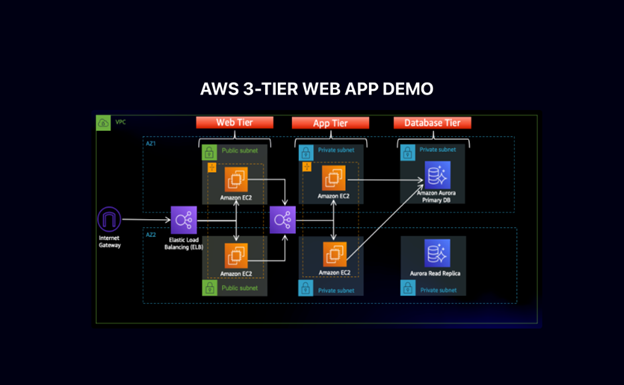
AWS THREE TIER WEB ARCHITECTURE
- Downloaded code from GIT hub using git clone
- To upload the code I have created a bucket in S3
- Then I have created an IAM role with permissions like AmazonSSMManagedInstanceCore and AmazonS3ReadOnlyAccess
These policies will allow our instances to download code from S3 and use systems manager Session Manager to securely connect to our instances without SSH keys through the AWS console.
NETWORKING and SECURITY
- I have created a VPC with the CIDR range (10.0.0.0/16) and created 6 subnets where 3 subnets will be in one Availability zone and 3 will be in another one.
Public-Web-Subnet-AZ-1, Private-App-Subnet-AZ-1, Private-DB-Subnet-AZ-1.
- Created Internet gateway for the public subnets in VPC and attach it to the VPC.
- Created NAT gateways for the instances in the app layer private subnet to be able to access the internet they will need to go through the NAT gate way. For high availability, I have deployed one NAT gateway in each of my public subnets.
- Created two route tables for public and private subnets and then edited the Routes by adding destination and targets that directs traffic from the VPC to the internet gateway for public subnet and NAT gateway for private subnet.
- Created security groups to tighten the rules around which traffic will be allowed to our Elastic load balancers and EC2 instances.
Internet-facing-lb-sg, web-tier-sg, internal-lb-sg, private-instance-sg, DB-sg.
DATABASE DEPLOYMENT
- Created a DB subnet group in RDS by adding the subnets that I have created in each AZ specifically for DB layer.
- Provided all the configuration which will be needed to create a DB and I would get a reader and writer instance in the database subnets of each availability zone.
App Tier Instance Deployment
- App instance deployment: Created an EC2 instance for the app layer and make all necessary software configurations so that the app can run. The app layer consists of a Node.js application that will run on port 4000. I have configured the database with some data and tables.
- Connect to instance: Then connected to the App layer instance using Session Manager using sudo -su ec2-user
Configure database:
- Configure database: Installed MySql CLI and then initiated DB connection with the RDS writer instance end point.
- Created Db and Table and inserted some sample data.
- Configure app instance: upload the app-tier folder to the S3 bucket and in SSM we need to install all of the necessary components to run the backend application. And install pm2 as well to keep our node.js app running when we exit the instance or if it is rebooted.
Internal load Balancing and Auto Scaling
- Created an Amazon machine image (AMI) of the app tier instance that I have created, and use that to set up autoscaling with a load balancer in order to make this tier highly available.
- Created target group to use with the load balance.
- Created an application load balancer with internal as this one will not be public facing, but rather it will route traffic from web tier to the app tier.
- Selected the sg that I have created for this internal ALB, now this ALB is listening for HTTP traffic on port 80. It will be forwarding the traffic to the target group that I have created earlier.
- Before configuring Auto scaling, need to create launch template with the AMI that I have created earlier.
- Created auto scaling group with the launch template that I have created for two private app instances in two AZs (private-app-subnet-AZ1, private-app-subnet-AZ2) and then attach it to appTierTargetGroup – ALB
WEB TIER INSTANCE DEPLOYMENT
- Update the config file: Before we create and configure the web instances, open up the application-code/nginx.conf file from the repo we downloaded.
- Replace [INTERNAL-LOADBALANCER-DNS] with your internal load balancer’s DNS entry. You can find this by navigating to your internal load balancer’s details page.
Web instance Deployment
- Launch an ec2 instance as WebLayer in public web subnet az1
- Connect to the instance in ssm using sudo -su ec2-user
- Configure web instance by running all the necessary components needed to run the front-end application.
-
Transformed TXT file to CSV using AWS Lambda function
- To process this I have used AWS Lambda with a custom Panda layer to Transform Text files stored in S3 buckets (input).
- When a text file is uploaded to an input bucket, it triggers the Lambda function, which processes the file and outputs a CSV to a different bucket (output bucket).
# Created a Dockerfile to build the layer in the right environment
- As lambda functions have limited built in libraries, so we need to create a custom layer containing pandas.
vi Dockerfile
FROM public.ecr.aws/lambda/python:3.12
RUN pip install pandas -t /opt/python/
RUN cd /opt && zip -r pandas-layer.zip python/
# Build and extract the layer
docker build -t pandas-layer-builder .
docker run –rm -v $(pwd):/output pandas-layer-builder cp /opt/pandas-layer.zip /output/
# Uploaded the layer
aws lambda publish-layer-version \
–layer-name pandas-layer \
–description “Pandas library for Lambda” \
–zip-file fileb://pandas-layer.zip \
–compatible-runtimes python3.12
## Step 2: Creating Lambda Function Code
# To create function directory
mkdir lambda-function
cd lambda-function
### 2.2 Created the Lambda Function
# lambda_function.py
import json
import boto3
import pandas as pd
from io import StringIO
import urllib.parse
import logging
# Configure logging
logger = logging.getLogger()
logger.setLevel(logging.INFO)
def lambda_handler(event, context):
Lambda function to process files from S3 triggered by S3 events
s3_client = boto3.client(‘s3’)
try:
# Process each record in the event
for record in event[‘Records’]:
# Get bucket and object key from S3 event
bucket = record[‘s3’][‘bucket’][‘name’]
key = urllib.parse.unquote_plus(record[‘s3’][‘object’][‘key’])
logger.info(f”Processing file: s3://{bucket}/{key}”)
# Only process .txt files
if not key.lower().endswith(‘.txt’):
logger.info(f”Skipping non-txt file: {key}”)
continue
# Read file from S3
try:
response = s3_client.get_object(Bucket=bucket, Key=key)
file_content = response[‘Body’].read().decode(‘utf-8’)
except Exception as e:
logger.error(f”Error reading file {key}: {str(e)}”)
continue
# Parse the file content
env_dict, services_set = parse_file_content(file_content)
if not env_dict:
logger.warning(f”No environments found in {key}”)
continue
# Create DataFrame
df = pd.DataFrame.from_dict(env_dict)
# Generate output filename
from datetime import datetime
timestamp = datetime.now().strftime(‘%Y%m%d_%H%M%S’)
base_name = key.replace(‘.txt’, ”).split(‘/’)[-1]
output_bucket = bucket.replace(‘-input-‘, ‘-output-‘) # Assuming naming convention
output_key = f”processed/{base_name}_output_{timestamp}.csv”
# Convert to CSV and upload
csv_buffer = StringIO()
df.to_csv(csv_buffer, index=True)
csv_content = csv_buffer.getvalue()
s3_client.put_object(
Bucket=output_bucket,
Key=output_key,
Body=csv_content,
ContentType=’text/csv’,
Metadata={
‘source-file’: key,
‘source-bucket’: bucket,
‘environments-count’: str(len(env_dict)),
‘services-count’: str(len(services_set)),
‘processed-timestamp’: timestamp
}
)
logger.info(f”Successfully processed {key} -> s3://{output_bucket}/{output_key}”)
return {
‘statusCode’: 200,
‘body’: json.dumps({
‘message’: ‘Files processed successfully’,
‘processed_files’: len(event[‘Records’])
})
}
except Exception as e:
logger.error(f”Error processing files: {str(e)}”)
return {
‘statusCode’: 500,
‘body’: json.dumps({
‘error’: str(e)
})
}
def parse_file_content(file_content):
“””Parse the configuration file content”””
env_dict = {}
services_set = set()
current_env = None
for line in file_content.split(‘\n’):
line = line.strip()
if not line:
continue
# Find environment lines (marked with *)
if line.startswith(‘*’) or ‘*’ in line:
current_env = line.replace(‘*’, ”).strip()
env_dict[current_env] = {}
logger.info(f”Processing environment: {current_env}”)
elif current_env and ‘:’ in line:
# Parse service:version pairs
parts = line.split(‘:’, 1)
if len(parts) == 2:
service = parts[0].strip()
version = parts[1].strip()
env_dict[current_env][service] = version
services_set.add(service)
return env_dict, services_set
### 2.3 Create Function ZIP
zip -r function.zip lambda_function.py
# Check size
ls -lh function.zip
## Step 3: Created S3 Buckets (Input and output)
# Set variables
ACCOUNT_ID=$(aws sts get-caller-identity –query Account –output text)
REGION=”us-east-1″ # Change as needed
STACK_NAME=”file-parser”
INPUT_BUCKET=”${STACK_NAME}-input-${ACCOUNT_ID}”
OUTPUT_BUCKET=”${STACK_NAME}-output-${ACCOUNT_ID}”
# Created buckets
aws s3 mb s3://${INPUT_BUCKET} –region ${REGION}
aws s3 mb s3://${OUTPUT_BUCKET} –region ${REGION}
echo “Created buckets:”
echo “Input: ${INPUT_BUCKET}”
echo “Output: ${OUTPUT_BUCKET}”
## Step 4: Create IAM Role for Lambda
# Create trust policy file
vi trust-policy.json
{
“Version”: “2012-10-17”,
“Statement”: [
{
“Effect”: “Allow”,
“Principal”: {
“Service”: “lambda.amazonaws.com“
},
“Action”: “sts:AssumeRole”
}
]
}
### 4.2 Create IAM Role
# Create the role
aws iam create-role \
–role-name lambda-file-parser-role \
–assume-role-policy-document file://trust-policy.json
# Attach basic Lambda execution policy
aws iam attach-role-policy \
–role-name lambda-file-parser-role \
–policy-arn arn:aws:iam::aws:policy/service-role/AWSLambdaBasicExecutionRole
### 4.3 Create Custom S3 Policy
# Create S3 policy
vi s3-policy.json
{
“Version”: “2012-10-17”,
“Statement”: [
{
“Effect”: “Allow”,
“Action”: [
“s3:GetObject”
],
“Resource”: “arn:aws:s3:::${INPUT_BUCKET}/*”
},
{
“Effect”: “Allow”,
“Action”: [
“s3:PutObject”,
“s3:PutObjectAcl”
],
“Resource”: “arn:aws:s3:::${OUTPUT_BUCKET}/*”
}
]
}
# Create and attach policy
aws iam create-policy \
–policy-name lambda-file-parser-s3-policy \
–policy-document file://s3-policy.json
aws iam attach-role-policy \
–role-name lambda-file-parser-role \
–policy-arn arn:aws:iam::${ACCOUNT_ID}:policy/lambda-file-parser-s3-policy
## Step 5: Create Lambda Function
### 5.1 Get Layer ARN
# Get the layer ARN (replace with your layer version)
LAYER_ARN=$(aws lambda list-layer-versions –layer-name pandas-layer –query ‘LayerVersions[0].LayerVersionArn’ –output text)
echo “Layer ARN: ${LAYER_ARN}”
### 5.2 Create Lambda Function
# Get role ARN
ROLE_ARN=”arn:aws:iam::${ACCOUNT_ID}:role/lambda-file-parser-role”
# Create the function
aws lambda create-function \
–function-name file-parser \
–runtime python3.12 \
–role ${ROLE_ARN} \
–handler lambda_function.lambda_handler \
–zip-file fileb://function.zip \
–timeout 300 \
–memory-size 512 \
–layers ${LAYER_ARN} \
–description “S3-triggered file parser using pandas”
echo “Lambda function created successfully!”
## Step 6: Configure S3 Event Trigger
### 6.1 Add Lambda Permission for S3
# Get Lambda function ARN
FUNCTION_ARN=$(aws lambda get-function –function-name file-parser –query ‘Configuration.FunctionArn’ –output text)
# Add permission for S3 to invoke Lambda
aws lambda add-permission \
–function-name file-parser \
–principal s3.amazonaws.com \
–action lambda:InvokeFunction \
–source-arn arn:aws:s3:::${INPUT_BUCKET} \
–statement-id s3-trigger-permission
### 6.2 Create S3 Event Notification
# Create notification configuration
vi notification-config.json
{
“LambdaConfigurations”: [
{
“Id”: “file-parser-trigger”,
“LambdaFunctionArn”: “${FUNCTION_ARN}”,
“Events”: [“s3:ObjectCreated:*”],
“Filter”: {
“Key”: {
“FilterRules”: [
{
“Name”: “suffix”,
“Value”: “.txt”
}
]
}
}
}
]
}
EOF
# Apply notification configuration
aws s3api put-bucket-notification-configuration \
–bucket ${INPUT_BUCKET} \
–notification-configuration file://notification-config.json
echo “S3 trigger configured successfully!”
## Step 7: Test the Setup
### 7.1 Create Test File
# Create a sample input file
vi test-input.txt
*development
web-service:v1.0.0
api-service:v1.1.0
database:postgres-13
*staging
web-service:v1.0.1
api-service:v1.1.0
database:postgres-13
redis:v6.2
*production
web-service:v1.0.1
api-service:v1.1.0
database:postgres-13
redis:v6.2
monitoring:v2.0.0
EOF
### 7.2 Upload and Test
# Upload test file
aws s3 cp test-input.txt s3://${INPUT_BUCKET}/
# Wait a few seconds, then check output bucket
sleep 10
aws s3 ls s3://${OUTPUT_BUCKET}/processed/
# Download the result
aws s3 cp s3://${OUTPUT_BUCKET}/processed/ ./ –recursive
### 7.3 Check Lambda Logs
# View Lambda logs
aws logs describe-log-groups –log-group-name-prefix /aws/lambda/file-parser
# Get recent logs
aws logs filter-log-events \
–log-group-name /aws/lambda/file-parser \
–start-time $(date -d ‘5 minutes ago’ +%s)000
## Step 8: Monitor and Troubleshoot
### 8.1 CloudWatch Monitoring
# Check Lambda metrics
aws cloudwatch get-metric-statistics \
–namespace AWS/Lambda \
–metric-name Invocations \
–dimensions Name=FunctionName,Value=file-parser \
–statistics Sum \
–start-time $(date -d ‘1 hour ago’ –iso-8601) \
–end-time $(date –iso-8601) \